
How to find an old Bitcoin wallet: where to look, how to handle what you find and when to get help
Published: Last reviewed: Editorial policy
To find an old Bitcoin wallet, search for three things: wallet files such as wallet.dat, devices and backups that may hold them, and written recovery words or old exchange emails. Work on copies, keep the computer offline while you look, and check balances only with public addresses. If a drive is damaged or a file is locked, bring in a specialist before you try repairs yourself.
Questions about your case? Message us:
Start with what you are looking for
Bitcoin does not expire. Coins bought years ago stay on the blockchain at their addresses. What you are really looking for is the secret that controls them. It may sit in a wallet file, on a device, on a printed sheet, in a list of words or behind an exchange login.
Work out which kind you probably had. Ask what year you bought, where you bought it and how you stored it. A purchase on an exchange points to an account. A desktop program points to a file. A small device points to written recovery words. Then gather clues.
- Emails from exchanges or wallet services, including welcome, confirmation and withdrawal messages.
- Bank, card or payment records that show a purchase of Bitcoin.
- Old notes, notebooks, printouts and photos of notes.
- Password manager entries, saved browser logins and old chats with friends or family.
- A list of every computer, phone, tablet and drive you used in those years.
Common wallet types and where traces of them sit
Names and folders differ by program, version and operating system, so search for file names and keywords as well as folders. The table lists common patterns, not a full list. Do not read too much into a name: other coins use names such as wallet.dat too, and a file can be empty.
| Wallet type | What to look for | Where it often sits |
|---|---|---|
| Bitcoin Core and the older Bitcoin-Qt | A file named wallet.dat, or a wallets folder that holds it | The program's data folder in the user profile, which is hidden by default on many systems |
| Electrum | Wallet files without an obvious extension, often in a wallets folder | A folder named Electrum or .electrum in the user profile |
| MultiBit | Files ending in .wallet or .key, plus backup copies | A MultiBit folder in the user profile, or in a backup of it |
| Web wallet account | A wallet ID in an old email, plus the account password | Mailbox, password manager or saved browser logins |
| Mobile wallet app | The app itself, or a recovery phrase shown in its settings | Old phones and tablets, and their cloud or computer backups |
| Hardware wallet | A small device, often with a card or sheet of recovery words | Drawers, safes and deposit boxes, with the written backup stored apart |
| Paper wallet | A printed sheet with QR codes or long strings of characters | Folders, safes and deposit boxes, or an old PDF or print job |
| Exchange account | Confirmation emails, statements and withdrawal notices | Mailbox, and bank or card statements that show the purchase |
Where to search on disks and backups
Old wallets often hide in places you stopped checking years ago. Start with the obvious folders, then widen the search to every backup you ever made.
Use the system search for file names such as wallet.dat and for words such as bitcoin and electrum, with hidden files shown. Run the search on a copy of the drive, not on the original.
- Old computers, laptops and tablets in a cupboard, a loft or a relative's house.
- External hard drives, USB sticks, memory cards and network storage.
- System backups, such as a phone backup, a Mac backup drive or a Windows backup set.
- Cloud storage and sync folders, and email attachments you once sent to yourself as a backup.
- Hidden program-data folders in the user profile, where wallet programs kept their files.
- Paper in safes, deposit boxes, books and old files.
Handle what you find: copies first, offline always
The first rule is to protect the original. Make a copy of each drive or file before you open anything, and keep the original unchanged in a safe place. Work only on the copy.
The second rule is to stay offline. Disconnect the computer from the internet while you inspect the copy. Old drives can carry malware, and wallet programs may start to sync or send data you did not expect. Do not install recovery tools you found through a search or an ad.
If a file was deleted, stop using that drive. New writes can overwrite the data you want. Do not run repair or undelete software on the original drive. A specialist can make an exact image of the drive first.
- Do not upload a wallet file, a phrase or a key to any website, including balance checkers.
- Do not paste recovery words or keys into a search box or a chat, even to ask for help.
- Keep a simple log: what you found, where, when and what you did.
- Label each copy clearly, and keep one extra copy on a different device.
Check for funds without exposing any secret
Addresses are public. If you find a list of addresses, you can look each one up on a block explorer and see its balance and history. An address that holds coins tells you the coins exist. It does not tell you that you still control the keys. Do the lookup on a different device from the old computer, and carry over only the addresses.
Never type a phrase or private key into an explorer or a balance tool. If you find written recovery words, restore them only in a current wallet program from the maker's official site, on a clean device, and compare the first address it shows with an address you know.
Once you confirm that funds are there, move them to a new wallet that you set up yourself, with a fresh backup. Old coins sent to an exchange can prompt questions about where they came from, so gather your old purchase records first.
When the wallet is locked, damaged or gone
A wallet file may ask for a password you no longer remember. A drive may not start. A file may be corrupt. These are technical cases, and each wrong attempt can lower the chance of success, so slow down before you try repairs yourself. Stop and ask a specialist if you see any of the signs below.
- A drive that does not power on, makes unusual noises or reports errors.
- A wallet file that asks for a forgotten password, where you remember parts of it.
- A deleted file, or a drive that was wiped or reformatted.
- A file or device in a format you do not recognise.
- A large sum, or an old machine that is also evidence in a dispute or an estate.
Working with a specialist, and who to avoid
Independent specialists can image a damaged drive, recover deleted files and test likely passwords on a copy of a wallet file. A sound engagement has a written scope, works on copies, leaves the funds in your control and never asks for your seed phrase. Fees are often tied to success, but terms differ, so read them first.
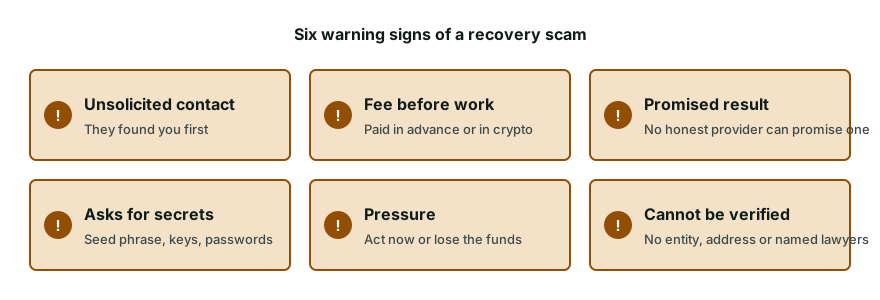
Avoid anyone who finds you first, asks for money before looking at your case, asks for remote access or promises certain success. A person who says they can see your lost Bitcoin and only need a fee to release it is running a scam.
We can help you sort what you have, tell you in writing whether a route looks realistic and coordinate independent specialists if it does. Our assessment costs nothing. We talk about fees only after we have told you whether we can help. We cannot promise to find a wallet or open one, and we never ask for your seed phrase, private keys or passwords.
Common questions
Is my old Bitcoin still there after many years?
Coins do not expire. They stay at their addresses as long as the network runs. What can disappear is your access, if the file, the device or the written words are lost. So the practical question is whether you can still find the secret that controls them.
How can I check the balance of an old address?
Paste the public address into a block explorer. Addresses are public, so this is safe. A balance checker never needs a seed phrase or a private key, so refuse any that asks. A balance shows that coins exist, not that you can still spend them.
Does a file named wallet.dat always contain Bitcoin?
No. Other coins use the same file name, and a wallet can be empty or hold only small change. Treat the file as a lead. Keep a copy, and have someone experienced inspect the copy before you draw any conclusion.
Can I install the old wallet program and open the file?
You can, but do it on a copy, offline, and only with software from the maker's official site. Some programs change a wallet file when they open it. That is why you keep the untouched original somewhere safe.
Should I take the old computer to a data recovery shop?
Only after you ask what they will do with the drive and the data. Ask for a written scope, ask them to work on an image, and do not hand over passwords or a seed phrase. A shop that understands wallets will not mind these conditions.
How we can help
- Wallet password and file recovery. Forgotten password or damaged wallet file: vetted independent specialists try recovery.
- Hardware wallet recovery help. Lost PIN, broken or lost hardware wallet: honest options and vetted independent labs.
- Crypto inheritance and lost access help. Lawful access to a deceased or incapacitated person's crypto through lawyers and specialists.
- Source of funds and source of wealth packs. Build a clear source of funds and source of wealth pack for exchanges, banks and processors.
Information on this page is general and not legal advice.